CopyTrans Contacts vs TextExhibit for exporting iPhone texts
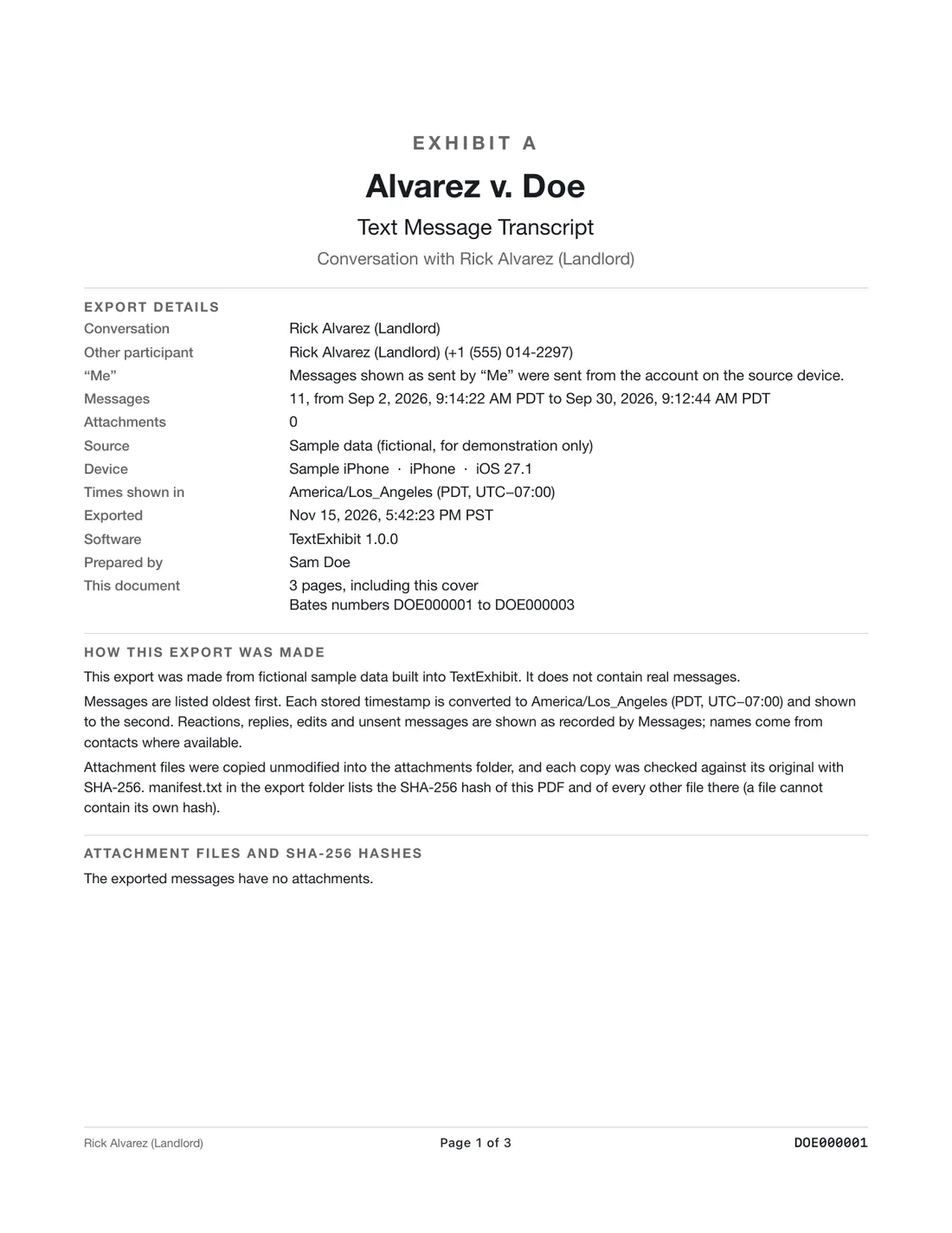
They run on different computers: CopyTrans Contacts is a $19.99 Windows app that exports iPhone SMS, iMessage, WhatsApp, Viber and LINE, and TextExhibit is a $24.99 Mac app that exports iMessage, SMS and RCS with court details. Free routes first (screenshots, Command-P in Messages on a Mac), then pick by the computer you have and the apps your messages are in.
Side by side (checked 2026-11-15)
- Price: CopyTrans Contacts $19.99, one-time payment per CopyTrans, 2 years of updates, 30-day money-back. TextExhibit $24.99 once, 3 Macs, 14-day refund.
- Platform: CopyTrans Windows 11, 10, 8.1, 7. TextExhibit macOS 14 Sonoma or later.
- Chat apps: CopyTrans SMS, iMessage, WhatsApp, Viber, LINE. TextExhibit iMessage, SMS, RCS.
- Formats: CopyTrans PDF, Word, Excel, text, CSV, HTML. TextExhibit PDF, CSV, HTML.
- Free version: CopyTrans trial exports 50 messages. TextExhibit exports any length with a watermark.
- Court details: CopyTrans's PDF shows sender and recipient numbers, timestamps and attachments, and offers an original-look or printer-friendly layout. TextExhibit adds a cover page, time to the second with time zone, Bates numbers, exhibit label and SHA-256 manifest.
CopyTrans Contacts is better if
- You have a Windows PC.
- You need WhatsApp, Viber or LINE.
- You want Word output.
- Your conversation is under 50 messages and the trial is enough.
TextExhibit is better if
- You have a Mac.
- You need Bates numbers, an exhibit label or a hash manifest.
- Your messages sync to the Mac's Messages app.
A note on CopyTrans's own advice
CopyTrans's export guide recommends a Windows PC for legal records, to keep attachments and timestamps. That reflects its own Windows tools. On a Mac, check that whichever tool you use keeps both.
Steps with each
- CopyTrans Contacts (Windows): install, connect the iPhone and tap Trust, open the messages section, select a conversation, click Export and choose the format.
- TextExhibit (Mac): open the app, choose the Messages app on the Mac, the iPhone over a cable, or a Finder backup, pick the conversation and date range, preview, then export PDF, CSV or HTML.
- With either: open the result, compare the first and last messages and the count with the phone, and keep the phone unchanged.
What to keep in mind
- Details are from CopyTrans's official pages on 2026-11-15.
- TextExhibit cannot run on Windows or read WhatsApp.
- Not legal advice.
Questions
Which is cheaper?
CopyTrans Contacts at $19.99 as of 2026-11-15; TextExhibit is $24.99.
Do both show phone numbers?
Yes, according to CopyTrans's PDF guide and TextExhibit's export.
Which exports Word?
CopyTrans Contacts.
Can I use both?
Only if you have both a Windows PC and a Mac.
Sources
- CopyTrans Contacts product page (checked November 15, 2026)
- CopyTrans Store (checked November 15, 2026)
- CopyTrans: how to export text messages from iPhone (checked November 15, 2026)
- CopyTrans: export text messages from iPhone to PDF (checked November 15, 2026)
Export the whole conversation
TextExhibit turns a conversation into one PDF with exact times, names and numbers, photos in place and page numbers, on your Mac. Free to preview; $24.99 once to export.