What is on the cover page of an exported text conversation?
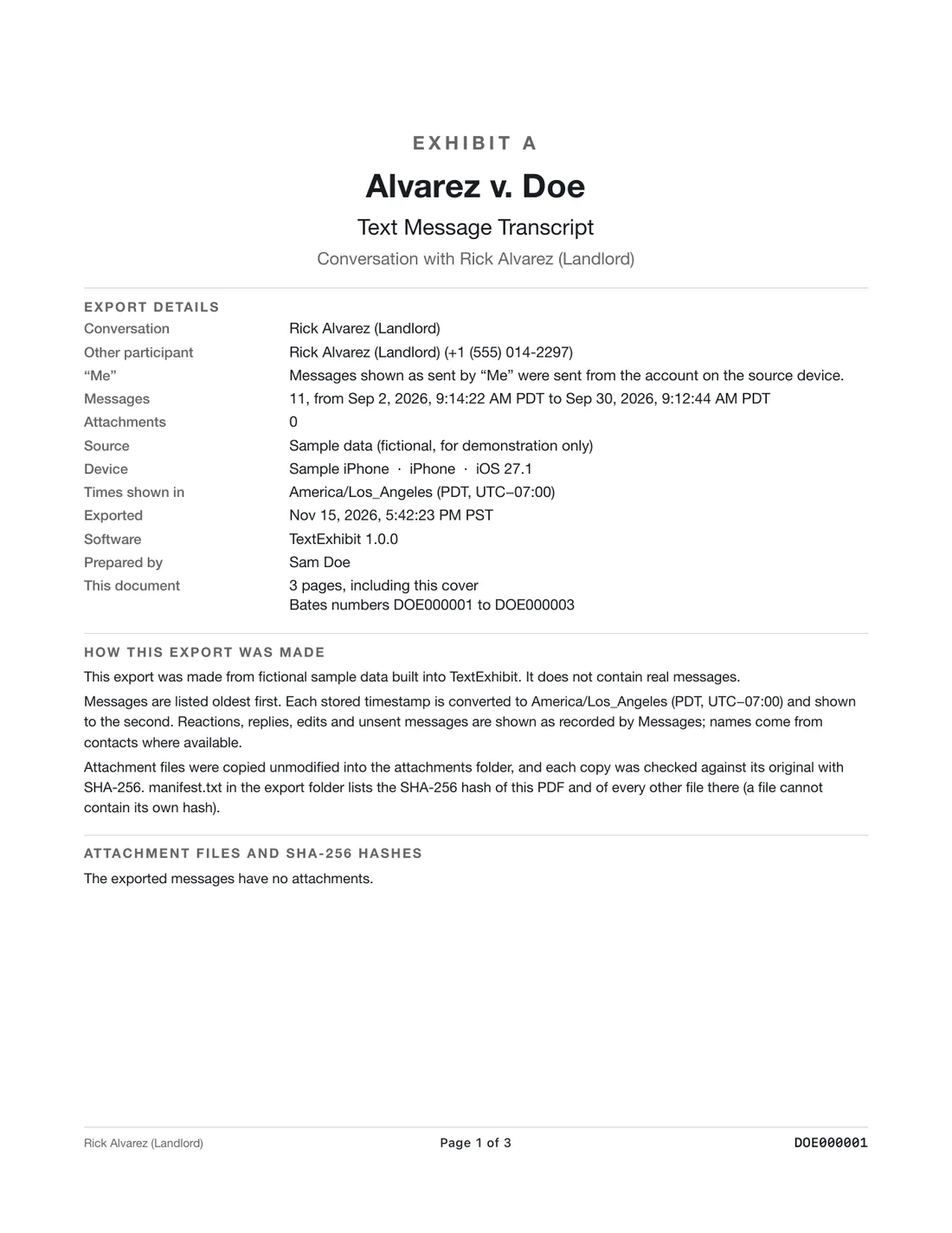
The cover page of a TextExhibit PDF states the source of the messages, the device, the date range, the number of messages and how the file was made, so the reader does not have to take your word for it. You can add a case title and an exhibit label, and the same cover page tells anyone who finds a loose printout what it is and where to look for the full file.
What it tells the reader
- Source: the Messages app on a Mac, an iPhone read over a cable, or a backup that was already on the Mac.
- Device: which phone the messages came from, as the source reports it.
- Date range: the first and last day included, so a reader can see if the export is partial.
- Message count: how many messages the file holds. If someone counts and gets a different number, that is a flag.
- How it was made: the app and version and the date of the export.
- Case title and exhibit label, if you entered them.
Why a cover page matters
A stack of printed texts says little on its own. Without a cover page nobody knows whether it is the whole conversation, one week of it, or a hand-picked selection. The cover page answers that in the first few lines, which is the most useful thing for someone who must decide whether to rely on the document.
It also helps you. In six months you will not remember which backup you used or what range you chose. The cover page remembers for you.
How to use it well
- Before exporting, set the date range you really mean, because it will be printed on the page.
- Enter the case title and exhibit label in the export options if you use them. See numbering exhibits.
- After exporting, read the cover page aloud once: does it match what you intended?
- Keep the manifest with the PDF. It lists each exported file with its SHA-256 hash; see the hash manifest.
What to keep in mind
- The cover page describes the export, not the truth of the messages. It does not prove who wrote them; see how to show texts are real.
- A cover page can be removed by someone who edits the PDF. The hash in the manifest is how you can show the original had one.
Questions
Can I leave the cover page out?
Treat it as part of the record. It is what makes the file explain itself.
Does the cover page show my name?
Only what you enter, such as a case title. The app does not upload anything or add your account details.
Does the CSV have a cover page?
No. It is rows of messages. Keep the PDF beside it for the description.
Export the whole conversation
TextExhibit turns a conversation into one PDF with exact times, names and numbers, photos in place and page numbers, on your Mac. Free to preview; $24.99 once to export.