Drop it in. Smaller.

Download for Mac or buy it for $19.99 once

Drag videos, photos, GIFs and PDFs onto SendSize and get smaller copies that still look good, in a new folder next to the originals. Sending to Discord, Gmail or WhatsApp? Pick it, and every file fits the limit. Free for up to 5 files at a time; $19.99 once for any number.

See how it works

SendSize runs on a Mac.Reading this on your phone? Send yourself the link and open it on the Mac where your files are.

Send the link to my Mac

Drop files in and get smaller copies; pick a destination when a file has to fit a limit.Recorded in SendSize with generated sample files, so the sizes are real results on those files. Waiting time is sped up. Background music, no narration.

The same app, the same results on your own files.

Before and after

Real files, real sizes

Five kinds of file people send every day, run through SendSize on an Apple M3 Mac on November 16, 2026. The sample files were drawn by FFmpeg, not anyone's photos or videos, and the sizes are exactly what the app produced.

Compress, the default

Just drop files in

No limit to choose: every file comes out smaller, with the quality kept first. Measured on sample files with the default Compress use.

  • Photo (JPEG)1.5 MB → 917 KB−39%
  • Screenshot (PNG)549 KB → 154 KB−72%
  • Scanned PDF962 KB → 511 KB−47%
  • 1080p screen recording32 MB → 17 MB−47%
  • MP4 already compressed once2.2 MB → 1.2 MB−45%
A frame of the 4K sample clip, original

Before131 MB

The same frame after compressing for Discord

After18.6 MB

A 25-second 4K HEVC sample clip, compressed in 97 seconds.

Video

A 4K video, under Discord's limit

Pick Discord and drop the video in. You get an MP4 under the 20 MB a free account takes, scaled to 720p, ready to post. Gmail, Outlook and WhatsApp work the same way with their own limits.

131 MB18.6 MB−86% smaller

PresetDiscord

A frame of the 4K sample clip

Before76.5 MB

The same frame in the GIF

After6.7 MB

A 12-second 4K sample clip, made into a GIF of 528 px · 10 fps in 17 seconds.

Video to GIF

Any clip, a GIF that loops

Pick Video to GIF and drop in clips or screen recordings. Each becomes a looping GIF made with gifski, and width and frame rate come down until it is under 10 MB.

76.5 MB6.7 MB−91% smaller

PresetVideo to GIF

A sample photo as HEIC

Before6.3 MB

The same photo as JPG

After6.5 MB

Five 12-megapixel sample photos; the 500-photo run is from the release build on the same Mac.

HEIC to JPG

iPhone photos that open anywhere

Pick HEIC to JPG and drop in photos or whole folders. Windows PCs, upload forms and older apps get JPGs; names, dates taken and subfolders stay as they were, and other files keep their format.

6.3 MB6.5 MBSame photo, a format everyone can open

500 photos in 3.3 seconds

PresetHEIC to JPG

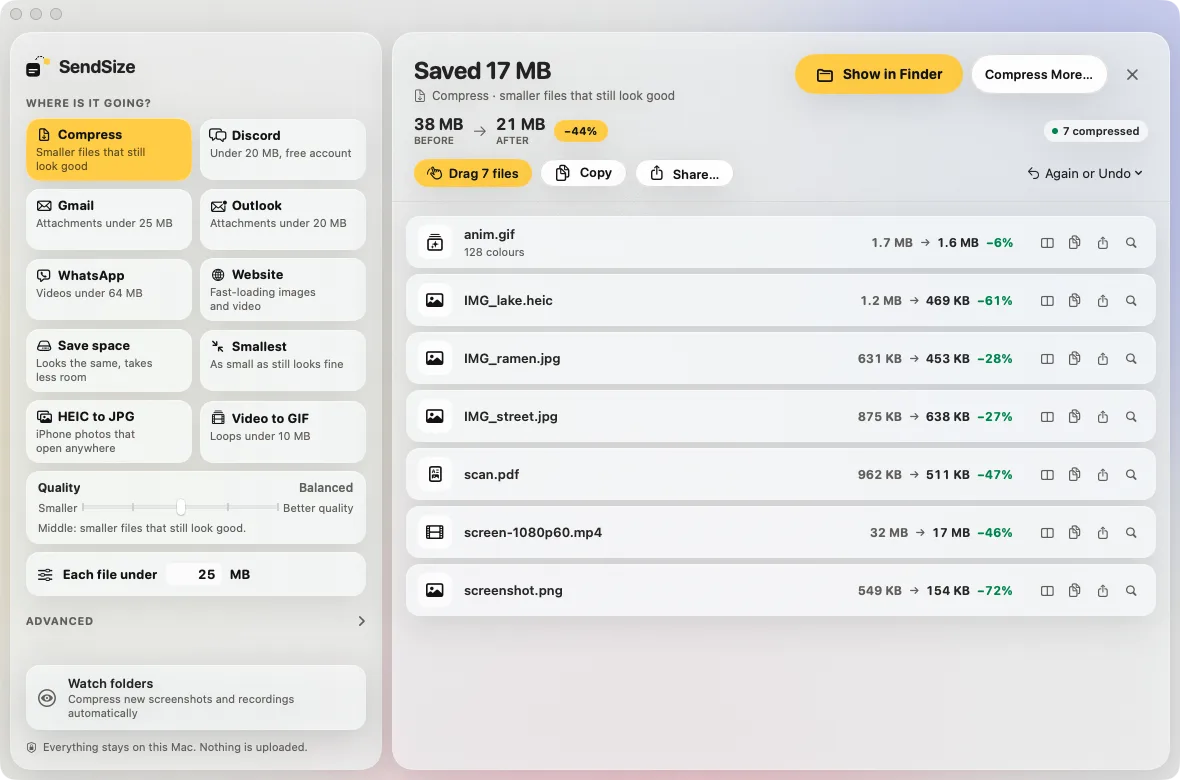
SendSize results after compressing 7 files from 38 MB to 21 MB, with Drag 7 files, Copy and Share buttons above the list and compare, copy, share and show buttons on each row
SendSize 1.1 with sample files. Hover over a row for its own buttons: compare, copy, share, show in Finder.

Send it

Compressed, then straight into the chat

When a batch is done, the results are ready to go. There is no need to open the output folder first.

  • Drag them out. Drag a row, or Drag 7 files for the whole batch, into Discord, Mail, Messages or a Finder window.
  • Copy. Copy puts the files on the clipboard, so you can paste them into a chat, an email or Finder.
  • Share. Share… opens the Mac's share menu: AirDrop, Mail, Messages and the rest.
  • Changed your mind? Again or Undo removes this batch's results, or compresses the same files again for another use.
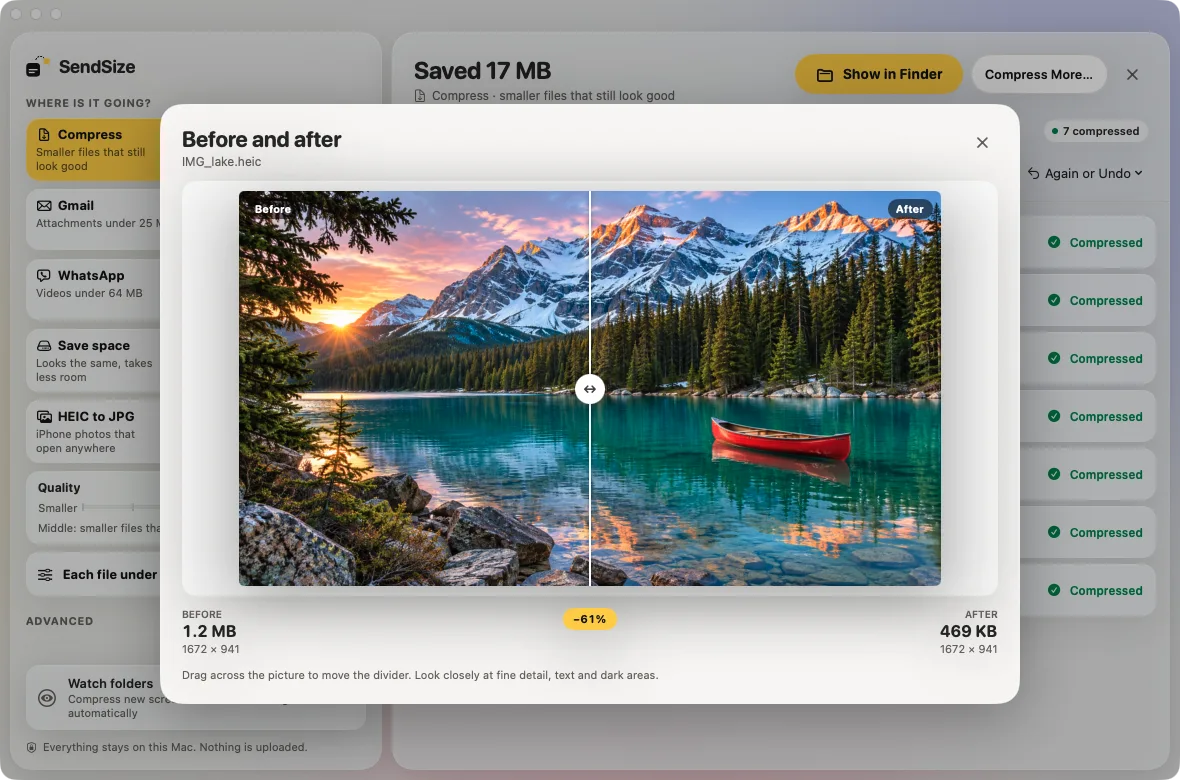
Before and after window in SendSize: a lake photo split by a divider, the original of 1.2 MB on the left and the result of 469 KB on the right, 61% smaller
A generated sample photo, not anyone's real photo: HEIC, 1.2 MB → 469 KB with Compress.

Before and after

See the difference before you send

Click a result to see it next to the original. Drag the divider across the picture and look at fine detail, text and dark areas, side by side at the same size.

  • Photos and screenshots are shown whole, the right way up.
  • Videos and GIFs show the same frame from the original and from the result.
  • PDFs show the first page of each. Under the picture: both sizes, the dimensions and how much smaller it got.
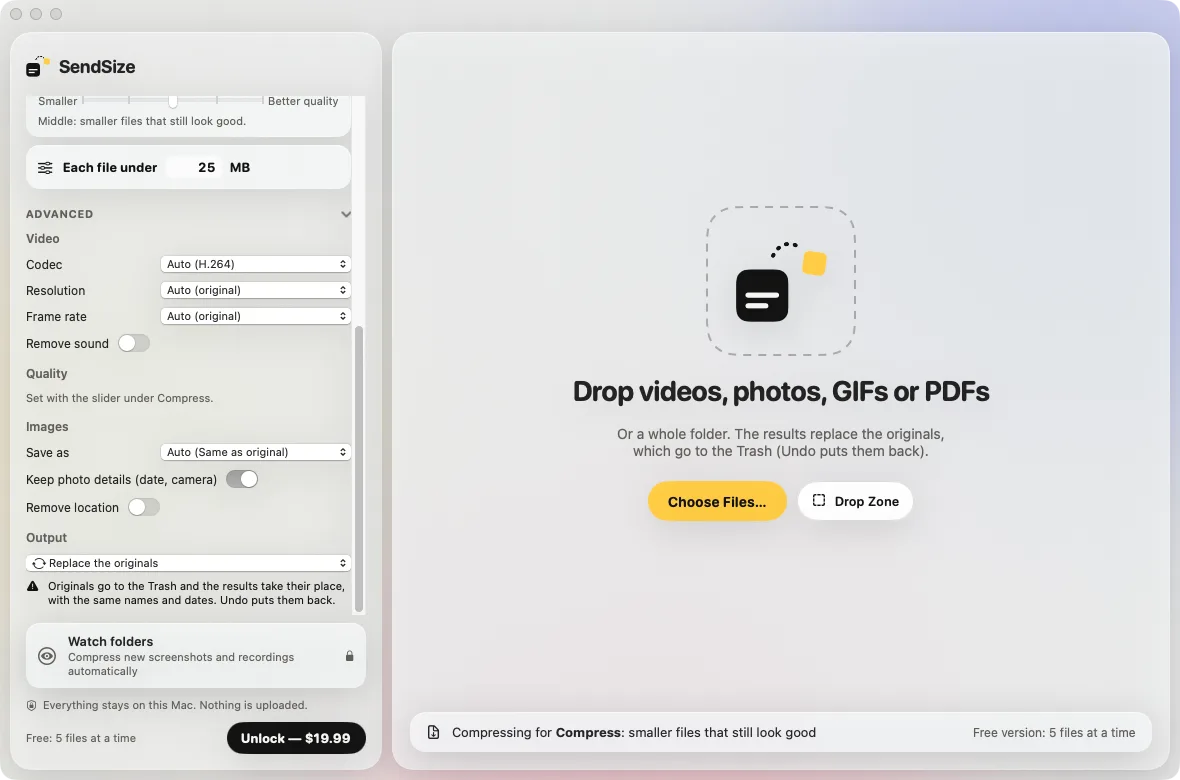
SendSize with Output set to Replace the originals and the note: originals go to the Trash and the results take their place, with the same names and dates; Undo puts them back
Watched folders always use a new folder next to them, and links (sendsize://) never replace originals.

Where results go

Next to the originals, or in their place

By default the smaller copies go into a new folder and the originals stay as they are. Under Advanced, or in Settings → Output, choose one of five places.

  1. 1A new folder next to the originals. Named “… (SendSize)”, with the same subfolders. The default.
  2. 2Same folder, with a suffix. photo.jpg gets photo-small.jpg beside it; you choose the suffix.
  3. 3A folder inside each original's folder. Trip/photo.jpg becomes Trip/SendSize/photo.jpg.
  4. 4A folder you choose. Each batch gets its own folder inside it.
  5. 5Replace the originals. The results take the originals' place with the same names and dates. The originals go to the Trash: Undo puts them back, and so does Put Back in the Trash. A file that would not get smaller is left alone.

Automation

Let it run by itself

Dragging files onto the window is one way. There are four more: a folder, the clipboard, a link and Terminal.

Watch folders

Point it at Screenshots or Downloads, and new files are compressed as they arrive. Turn on Open SendSize at login and it is always ready.

License

Clipboard

Copy an image, or take a screenshot with Control-Shift-Command-4, and the clipboard gets a smaller copy to paste. Text is never touched.

License

Links

sendsize://compress?path=…&preset=discord compresses in the background, from Shortcuts, Raycast or any script.

Free: 5 files at a time

Command line

Install sendsize in Settings → Automation, then run sendsize compress clip.mov --preset discord in Terminal.

Free: 5 files at a time

Links, use ids and command optionsHow to make screenshots and screen recordings smaller on a Mac automaticallyHow to compress a video with Shortcuts or Raycast on a MacHow to batch compress videos and images from the command line on a Mac

Links and the command line follow the same rule as the app: 5 files at a time for free, any number with the license.

$19.99

once, with no subscription

3Macs

on one license

14days

to ask for a refund

0

files uploaded anywhere

Drop it in. Pick a limit only when you need one.

SendSize, for files that are too big to send

Pick x Drop

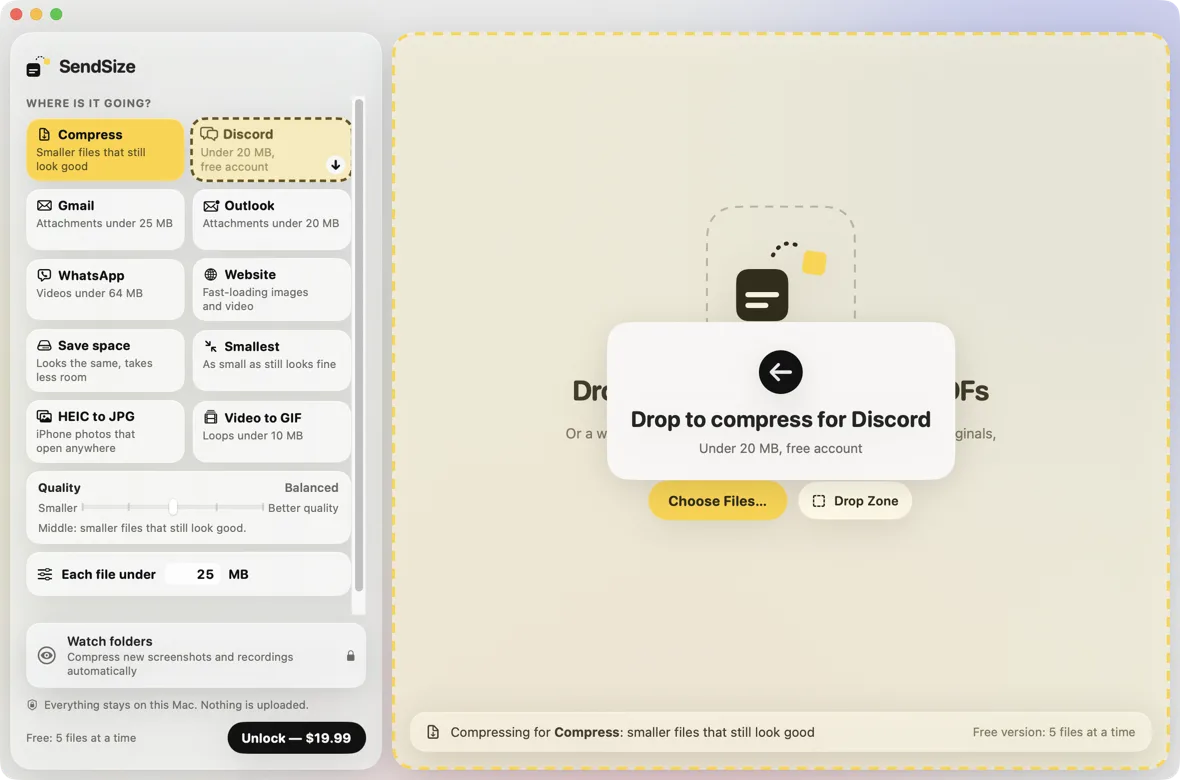
SendSize window: the use cards on the left with Compress selected, a file dragged onto the Discord card, and the message Drop to compress for Discord
SendSize 1.1. Drop files on a card to use it just this once, or anywhere on the right for the use that is selected.

1

Compress, or pick where it is going

Compress makes every file smaller and keeps the quality first. When there is a limit, pick Discord, Gmail, Outlook, WhatsApp, a website, or type a size under Each file under. Codecs, resolution and frame rate are under Advanced.

2

Drop files or a folder

Videos, photos, GIFs and PDFs, mixed together, or a whole folder with folders inside it. Each file gets what suits it.

3

Send

The copies go into a new folder next to the originals, named with “(SendSize)” at the end, with the same subfolders, or wherever you set under Output. Drag them straight into a chat, or copy them. The list shows each file before and after.

Three steps, then the files are ready.

Wherever it is going.

Every place has its own limit, and most of them change it every few years. SendSize knows the numbers so you do not have to look them up. All the limits, with sources.

Discord

Free accounts can send files up to 20 MB; Nitro Basic 50 MB. Pick the plan and every video lands under it.

Compress for Discord

Email

Gmail takes 25 MB of attachments per email, Outlook.com 20 MB for the whole message. Files arrive as files, not as links.

Videos for email

iMessage and WhatsApp

WhatsApp’s default video limit is 100 MB at 720p. Send a smaller copy yourself instead of letting the app shrink it.

Videos for WhatsApp

Slack and Teams

Slack takes files up to 1 GB; a Teams chat 100 MB per file. Smaller files upload faster and play in the preview.

Files for Slack

Your website

Images as WebP, 2000 pixels on the long edge, location removed. Videos in H.264 that every browser plays.

Images for the web

HEIC to JPG

iPhone photos as JPG for forms, Windows PCs and sites that refuse HEIC, with the date taken kept.

Convert HEIC

GIF

Turn a screen recording into a GIF that stays under a size, or shrink a GIF that is too big to post.

Video to GIF

PDF

Scans and image-heavy PDFs made smaller by recompressing their pictures. The text stays text.

Compress a PDF

Your platform is not here? Type its limit under Each file under.

A whole folder, one drop.

Most tools take one file at a time. SendSize takes the folder from the trip, the shoot or the project, with every folder inside it.

  • Same folders, new place. The output mirrors the folders you dropped, in a new folder next to the originals, named with “(SendSize)” at the end, with the same subfolders.
  • Originals untouched, unless you say so. SendSize only reads them. If a file would not get smaller, the original is copied instead, so nothing ends up bigger. Want the smaller files in their place? Choose Replace the originals: the originals go to the Trash, and Undo puts them back.
  • Dates kept. Copies keep the original created and modified dates, and photos and videos keep the date and place they were taken, so they sort the same in Photos and Finder.
  • From Finder. Select files, right-click and choose Compress with SendSize from the Services menu: it uses the last place you picked.
  • Watch a folder. Point SendSize at your Screenshots or Downloads folder and new files are compressed as they arrive. Part of the license.

Free for 5 files at a time. A whole folder needs the $19.99 license.

Your files stay on your Mac.

Websites that compress files ask you to upload them first. SendSize does the work on your Mac, so there is no upload, no size cap and no waiting in a queue.

  • No uploads. Your videos, photos and documents are never sent to us or anyone else. No account.
  • No size limit. A 4 GB video is as welcome as a 4 MB one. Long 4K videos take a while and your fans may spin; the progress bar says how long.
  • Works offline. Everything it needs is inside the app, including FFmpeg. There is nothing to download on first launch. Open source parts
  • Online for two things. Checking a license key and checking for updates. Neither includes your files. Privacy policy

Try it free. $19.99 for everything.

The free version does everything the paid one does, up to 5 files at a time, so you can see the result on your own files before you pay. Pay once when you want whole folders.

Free

For a few files now and then, and for seeing the result first.

$0no time limit

Up to 5 files at a time.

  • Every compression feature and preset
  • Up to 5 files at a time
  • No watermark, no sign-up
Download for Mac

Price in USD. Buying opens a secure checkout, and your license key arrives by email. Requires macOS 14 Sonoma or later. Pricing details

Before you ask.

What it compresses, how small, how good it looks, and what it does not do.

All questions Guides

It makes copies of your videos, photos, GIFs and PDFs that are small enough for the place you are sending them. You pick where the files are going (Discord, Gmail, Outlook, WhatsApp, a website, or a size you type), drop in files or a whole folder, and it writes the smaller copies into a new folder next to the originals. It runs on your Mac and does not upload anything.

Yes, with every folder inside it. The copies go into a new folder next to the originals, named with “(SendSize)” at the end, with the same subfolders, so you can find each file where you expect it. Mixed folders are fine: videos, photos and PDFs each get the treatment that suits them, and files it cannot handle are listed with the reason instead of stopping the batch.

Yes. When a batch is done, drag a file from the results list, or use Drag N files for all of them, into Discord, Mail, Messages or a Finder window. Copy puts the files on the clipboard to paste into a chat, and Share… opens the Mac's share menu with AirDrop and Mail. There is no need to open the output folder.

Each destination is a preset with that platform's limit, which we check on the platform's own help page: on 2026-11-16, Discord allowed 20 MB on a free account, Gmail 25 MB of attachments per email and Outlook.com 20 MB per message. When a platform changes a number, an app update changes the preset. You can always type your own limit instead.

A smaller file always has less detail than the original; the question is whether you notice. SendSize uses x264 and x265 through FFmpeg, with two passes when aiming at a size, which keeps text and edges readable at small sizes. In our test, a 26-second 1080p screen recording at 60 frames per second went from 5.2 MB to 0.99 MB and the icon labels were still readable. A video squeezed far below its length, such as 10 minutes into 10 MB, will look soft.

No. SendSize compresses and converts files on your Mac. The files you add, the copies it makes and their names stay on your Mac and are not uploaded to us or anyone else. The app goes online only to check a license key and to look for updates. There is no account and no file size limit, because nothing goes through a server.

The free version has every feature and every preset, with no watermark, up to 5 files at a time. A $19.99 one-time license removes the limit, so you can drop in a folder of any size, and adds folder watching and compressing copied images. Everything else that came in version 1.1, from dragging results out to links and the command line, is free. One license works on 3 Macs.

No more “file too large.”

Download SendSize and try it on 5 files for free. Pay $19.99 once when you want more.